Windows Desktop Productivity

The command center for your Windows desktop.

FloDee is a floating control hub that puts your applications, files, notes, and window management one click away — engineered to stay out of your way until you need it.

The free trial is fully functional — every feature unlocked, no credit card required, and it never contacts our servers unless you purchase a license.

🛡️ AI Models Used for Safety & Quality Control: FloDee 1.0.213 has been reviewed for code integrity, safety, and vulnerabilities to hacking by Claude Fable 5 on 2026-07-12 at 03:04 PDT (10:04 UTC) — no malware or unsafe behavior found. Details · test builds.

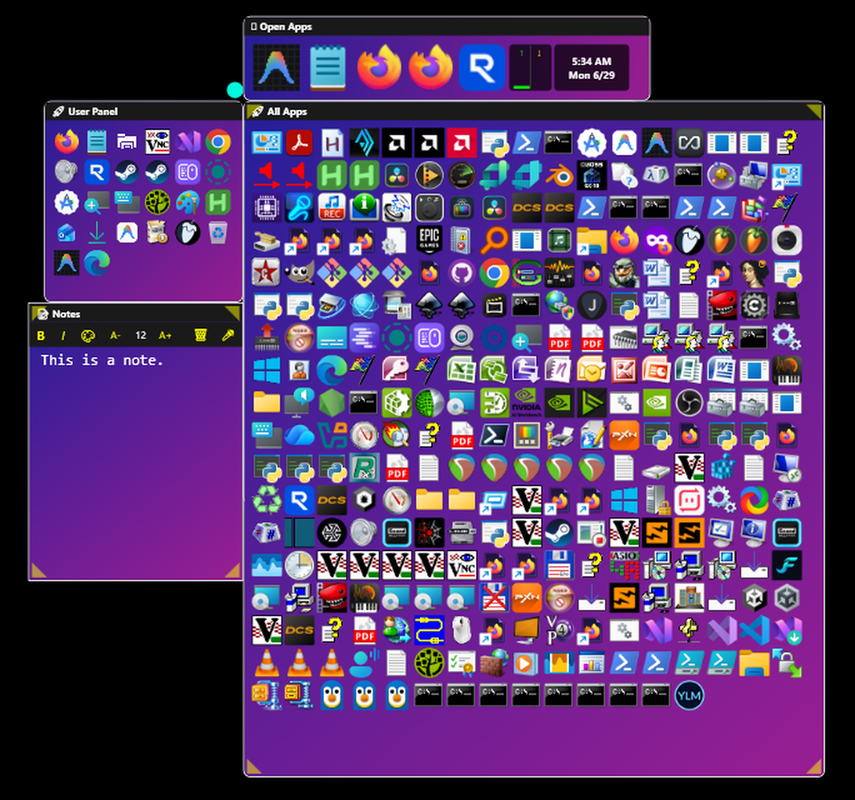
FloDee floating desktop hub running on Windows
$25
One-time license — no subscription
1440 hrs
Fully functional free trial (60 days of use)
3 years
Free updates & support per version
Zero
Telemetry or data collection

Everything at your fingertips

One small dot on your screen. Hover over it and your entire workflow opens up.

Floater Dot

The central hub of FloDee. Drag it anywhere on screen and all your panels follow. Hover to open your panels, quick-click to show the desktop. Double-tap Ctrl to open FloDee without touching the mouse.

Open Apps Panel

See all your running apps at a glance. Left-click to bring any window to front. Middle-click to close it gently — or double-click your middle mouse button to force-kill a frozen app.

Files Panel

Instant access to your most-used folder. Left-click to open files, middle-click to reveal them in Explorer, right-click for the full Windows shell menu. Ctrl+Scroll to cycle view modes.

User Apps

Your personal quick-launch bar. Drag and drop any file, folder, or executable to add it. Hold Ctrl and drag to rearrange. Right-click folders to detach them or drill inside them.

Notepad Panel

Persistent notes that save automatically as you type — no Ctrl+S needed. Includes inline search, rich formatting, voice dictation, and a quick-access clipboard history.

Live Preview Panel

Hover any running app in Open Apps to see a live thumbnail. Scroll to zoom, drag to pan, middle-click to dismiss it until next hover.

A few ways to open it

FloDee is designed to stay out of your way until you need it. A handful of the fastest ways in:

Ctrl×2

Open or close FloDee from anywhere — also double-tap Ctrl+Alt+F, or double-click your middle mouse button.

Alt+Left-click

Lock Open — click the Floater to keep it visible.

Esc×2

Instantly close every panel.

Middle-click

Close an Open Apps tile gently — double-click Middle to force-kill a frozen one.

Ctrl+Scroll

Resize icons or cycle the Files view mode while over a panel.

F1

Instant help for the panel under your cursor (same content as its ? button).

Hover+Shift

Expand any control's tooltip to full detail — tooltips show a short label first, then the whole description.

That's the short list — every panel has its own right-click menu and a few more tricks once you're in there, and F1 will always tell you what they are.

Private by design

FloDee is built so your work never leaves your machine. No accounts, no cloud, no quiet background connections.

Zero telemetry

No analytics, crash reports, or usage data of any kind. Settings, notes, and panel layouts are stored only on your own computer.

Encrypted peer-to-peer

Chat Channel messaging connects directly between FloDee installations over TLS — never through our servers — and pins each contact's certificate, warning you if it ever changes.

Sandboxed file transfers

Incoming files are confined to your configured download folder — a received file can never write outside it, no matter what its name contains.

Minimal license check

The only automatic connection is a license check carrying your key and a one-way hardware hash — never your name or files. Trial installs make no connection at all.

Simple, one-time prices

No subscription. Buy once, use it for years. Try the fully functional free trial for 1440 hours (60 days) first — no features locked.

Personal
$25
one-time purchase · instant download
  • One-time purchase — no subscription
  • All current features included
  • Personal (non-commercial) use
  • Activate on up to 3 machines
  • Version supported for 3 years with free updates
  • Email support

All versions of FloDee are supported for 3 years with free updates and support. After a version's 3 years have expired, that version of FloDee is no longer supported aside from emergency patches.

Want to try first? Download the free 1440-hour (60-day) trial

🎁 Gift FloDee to a Friend

Same one-time price — we email the license key straight to them, so there's nothing for you to forward.

$25
one-time purchase · gift

Your friend gets the activation email and the license — you'll still see the payment receipt from PayPal.

Common questions

What Windows versions does FloDee run on?

FloDee runs on Windows 10 and Windows 11. It requires a 64-bit system.

How does the free trial work?

Download and install FloDee — it runs fully featured for free with no credit card required, and installing/using it never contacts our servers at all (only purchasing and activating a license key does). The trial limit is 1440 hours (the amount of hours in 60 days) of actual use, not 60 calendar days — it's counted only while FloDee is actually running, so your install can sit on your PC well past 60 days as long as you haven't used up those hours. When the trial ends, purchase a license key to continue using it. If a new update is released after your trial ends, you'll get a 7-day preview window to check out what's new before deciding to buy.

How do I get my license key after purchasing?

Your license key is generated and emailed to you automatically, usually within seconds of purchase. Purchasing doesn't separately hand you the app — if you haven't already installed FloDee, grab it from the same download link as the free trial (it's the exact same installer either way). Once it's running, enter your key by right-clicking the floater dot, choosing "Settings," opening the "Help" tab, and clicking "Activate License."

Can I use FloDee on more than one computer?

Yes — a license activates on up to 3 machines. If you need to move a license, you can deactivate a machine from within FloDee to free up a seat. If a machine dies or gets reformatted before you could deactivate it, email support and we'll free the stuck seat for you. We're glad to help with lost seats — just note that, to prevent abuse, seat resets and replacement keys are handled at our discretion, may require proof of purchase, and only ever restore the license you already own.

Is there a subscription fee?

No. FloDee is a one-time purchase — no recurring fees. All versions of FloDee are supported for 3 years with free updates and support. After a version's 3 years have expired, that version of FloDee is no longer supported aside from emergency patches.

Where can I see every mouse and keyboard shortcut?

Hover over any panel and press F1 — it brings up that panel's help, including its click and key combos. The ? button in a panel's title bar shows the exact same help; F1 is just a keyboard shortcut to it so you don't have to go find the button.

Why is FloDee so efficient?

In simple terms: rather than you traveling to your tools, they travel to you — cutting out the distance (and the time) it takes to reach them, greatly reducing repetitive strain injuries such as carpal tunnel syndrome, while at the same time boosting productivity exponentially.

Is FloDee secure?

FloDee collects no telemetry, analytics, or usage data of any kind, and stores everything you create — settings, notes, panel layouts — only on your own computer. The only thing FloDee ever sends out automatically is a license check, which contains your license key and a one-way hash of a couple of hardware identifiers, never your name, files, or the original hardware IDs themselves. If you use the Chat Channel panel to message other FloDee users, those connections are TLS-encrypted; the first time you connect to a new contact FloDee remembers their certificate, and warns you if it ever changes unexpectedly. Incoming file transfers are sandboxed to your configured download folder — a received file can never write outside it, no matter what its name contains.

What does FloDee connect to over the network?

Very little, and nothing hidden. If you've activated a license, FloDee briefly checks in with the license server once at startup (and explicitly when you activate or deactivate a machine) — if you're offline, this fails silently and never blocks you from using the app; trial users with no license key make no such connection at all. The Chat Channel panel is peer-to-peer, not routed through any server of ours — messages and files between FloDee instances are encrypted, and nothing leaves your local network unless you actually message someone. And if you add the optional OBS Control panel, it talks only to your own OBS Studio's built-in WebSocket server at the address you configure (your own PC by default). There's no background update-checker and no analytics calls of any kind.

Why do some features work differently (or not at all) on my PC?

Two common, by-design reasons. First, administrator mode: Windows deliberately restricts interaction between programs running at different privilege levels (a protection called UIPI). If FloDee runs as administrator, normal apps like Explorer can't drag-and-drop into it; if it runs without administrator rights — the default, and by Windows design the more flexible mode for the everyday user — it can't manage windows belonging to elevated apps. Neither mode is broken; each trades some capabilities for others, so if something seems unresponsive, try the other mode first. Second, hardware: a few functions depend on your specific hardware and drivers (mice without tilt or thumb buttons, unusual display adapters, remote-desktop sessions) and may be limited or unavailable on some systems. These are Windows and hardware constraints, not defects in FloDee.

How do I get support?

Email us at flodeeapp@gmail.com and we'll get back to you as soon as possible.